This tutorial is meant to help you to create a simple UI mod. You will learn how to create a simple button which will change it's caption once you press it. It will also give you tips on using lua-scripts, xml-elements, the Tuner and how to write not-corefile-dependant mods. Before reading this tutorial, I'd recommend first reading this excellent Modders Guide from Kael.
Changelog:
2010-11-25 Added chapter 10 about source code
1. You are trying to trick me into reading some kind of manual! No way, Jose!
Here's a quick list of steps how to create a simple mod with an UI element.
There are two types of xml-elements used in Civ: <GameData> and <Context>. GameData-elements changes the game rules and has nothing to do with this tutorial. Context-elements on the other hand create all the windows and buttons you can see. Actually almost everything you can see in Civ is created with Context-elements. So when ever this tutorial refers to xml it's always about Context-elements.
3. Local warming a.k.a why my neighbors ice caps aren't melting
There are three different levels of environment scope in Civ's Lua-engine. If you fail to change a valua or call a function then it most likely because it doesn't exist in your current environment.
If all your mods values and functions are within a single thread then you can eg. call a function from anywhere simply like this: MyFunction()
If your mods values and functions are spread in different threads then it's not that simple anymore. You can't call a function within a different thread with normal methods. You have to do that using LuaEvent's or ShareData.
I would recommend that you try to create a single thread for your mod if it's possible. If you have only one lua- and xml-file in your mod then that's easy:
If you have multiple files in your mod then you can put them in a single thread using this method.
Normally you would access an xml-element within your thread like this:
But if you wanted to do the same thing with an element within PracticeMod2Button1 thread you would have to do it like this:
Remember that you have to use those ID-tags in your xml-elements to be able to manipulate them at all through lua.
6. OMG! My Tuner is live! Or on fire?
Personally I could almost live without ModBuddy, but I would refuse to do any modding without Firaxis Live/FireTuner. This program is a Lua console that you can use to either keep track watch happening with all the lua stuff behind the game engine or run your own lua commands. Here's what you can do with it.
7. Waiter, there's a ContextPtr in my Tooltip!
ContextPtr object can be accessed from all threads. You can use it to either create new threads or manipulate xml-elements in any thread.
8. Who let the dogs out (into MY front lawn)
In Civ you can have multiple mods functioning at the same time so you should try to design your mods so that they will interface other mods as little as possible. Maybe the biggest question is when and how you should modify the core-files (eg. InGame.xls)? Core-files are the lua- and xml-files that come with the vanilla Civ. You can overwrite those core-files by simply adding a file with the same name into your mod. If possible you should avoid modifying them or at least do it the "right way".
Changelog:
2010-11-25 Added chapter 10 about source code
1. You are trying to trick me into reading some kind of manual! No way, Jose!
Here's a quick list of steps how to create a simple mod with an UI element.
- Create a Lua-project in ModBuddy.
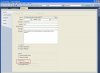
- Add a lua- and xml-file with exactly the same name to that project.
- Add an InGameUIAddin for your lua-file. This will also automatically import the xml-file.

- Create an xml-element in your xml-file.
- All done! You don't need to write anything in lua-file for just creating an xml-element and showing it.
There are two types of xml-elements used in Civ: <GameData> and <Context>. GameData-elements changes the game rules and has nothing to do with this tutorial. Context-elements on the other hand create all the windows and buttons you can see. Actually almost everything you can see in Civ is created with Context-elements. So when ever this tutorial refers to xml it's always about Context-elements.
3. Local warming a.k.a why my neighbors ice caps aren't melting
There are three different levels of environment scope in Civ's Lua-engine. If you fail to change a valua or call a function then it most likely because it doesn't exist in your current environment.
- local = Any values declared with this are only available from the current lua-element and it's children.
- thread = This is the default scope. You can change non-local-values from any file or function as long as they are in same thread. Normally a single mod creates a single thread.
- global = Truly global environment is not available in Civ. There is a top level lua-environment "_G" (=Main State), but you can't access that from a mod. Otherwise all threads could be accessed through this (Main State -> Threads).
If all your mods values and functions are within a single thread then you can eg. call a function from anywhere simply like this: MyFunction()
If your mods values and functions are spread in different threads then it's not that simple anymore. You can't call a function within a different thread with normal methods. You have to do that using LuaEvent's or ShareData.
I would recommend that you try to create a single thread for your mod if it's possible. If you have only one lua- and xml-file in your mod then that's easy:
- Use exactly the same name for both lua- and xml-file.
- Add an InGameUIAddin for your lua-file. This will automatically also import the xml-file.
- This should create a single thread that is called the same as your file name.
- If you are using my templates then the Tuner log should read something like this after the game has started:
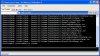
- Also in the game the button should look like this before and after it has been clicked:


If you have multiple files in your mod then you can put them in a single thread using this method.
- Create main lua- and xml-files and use exactly the same name for both of them. Your thread will be named after them. You can write also your normal code in them, but their main purpose is to bring all the other files into this thread.
- Add an InGameUIAddin for your main lua-file. This will automatically also import the main xml-file.
- This should create a single thread that is called the same as your file name.
- If you would add a second InGameUIAddin then that would create a second thread and we don't want that.
- Now all your lua-files will be merged into this main lua-file using include command.
- You may have noticed that there is no default initialization function in Civ's lua-engine. You might need it to e.g. initialize your main window AFTER you have all function declared and ready. With this method it's easy to do that by inserting your own init-function after all the include commands. Here's an example main lua-file:
Code:print("PracticeMod2.lua loaded") include("Extra1.lua") include("Extra2.lua") Init() --My initialization function - Now we will import all the xml-files using the main xml-file. Here's an example main xml-file:
Code:<Context> <LuaContext FileName="PracticeMod2Button1" ID="PracticeMod2Button1" Hidden="0" /> <LuaContext FileName="PracticeMod2Button2" ID="PracticeMod2Button2" Hidden="0" /> </Context> - Warning: Do not create lua-files that are named like these xml-files. Otherwise also your lua-code will be divided into multiple threads.
- There are couple minor side-effects with this one. You will get an error message saying that the lua-file for this xml-file wasn't found. And also all these xml-files will be created within their own thread. I haven't found any other way to do this, but don't worry...it only looks bad.
- If you are using my templates then the Tuner log should read something like this after the game has started:
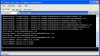
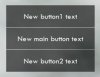
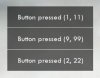
- Also in the game the buttons should look like this before and after they have been clicked:
Normally you would access an xml-element within your thread like this:
Code:
Controls.MyButton:SetHide(true)
Code:
ContextPtr:LookUpControl("PracticeMod2Button1/MyButton"):SetHide(true)6. OMG! My Tuner is live! Or on fire?
Personally I could almost live without ModBuddy, but I would refuse to do any modding without Firaxis Live/FireTuner. This program is a Lua console that you can use to either keep track watch happening with all the lua stuff behind the game engine or run your own lua commands. Here's what you can do with it.
- Log (Lua Console tab): If you execute a print("Hello world") command from your mod then this is the place where you can the see result. It also shows you all the lua errors that you may encounter. The first word in every row is the thread name from where that log message is coming from.
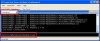
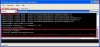
- Lua console (Lua Console tab): At the bottom row you can see an editbox where you can execute lua commands. But before you try to do that you have to choose a thread which you want to direct that command. Just underneath the "Lua Console" tab there's a dropdown box. By default "Main State" is chosen. You can't really get anything done with this one, but more likely be greeted with an error message. Choose your mods thread from this (it's normally called the same as your mod or main file). Now all your commands will be executed as you would have written them into your actual code. Here are example logs about using wrong threads.
- Other thing you can use this console is to reload your lua-files without ever leaving the game. You can do that with include("YourFileName.lua") command. But be aware that there are some difficulties with this one. It doesn't replace your current file, but simply add that file a second time to your mod. Therefore it will overwrite any values or functions you had with the same name. But if you eg. had event registration in that file then you have now registered twice into that event (=your function is called twice). At the moment there is no known way to reload your xml-files.
- Table browser (Table Browser tab): With this tool you can see all the tables within the selected thread. Confusion comes when you try to select your own mods thread from the dropdown. You can't find it! You have to add it here by right clicking on the right side (on the blue bar) of this dropdown. Choose "Edit panel" and then tick your mods checkbox on the opened list.
7. Waiter, there's a ContextPtr in my Tooltip!
ContextPtr object can be accessed from all threads. You can use it to either create new threads or manipulate xml-elements in any thread.
- Creating new threads with ContextPtr
Code:
--This command creates a new thread. The functions argument is the name
--of the lua- and xml-file you wish to use.
--You don't normally need to use this command.
ContextPtr:LoadNewContext("FileNameWithoutTail")- Manipulate xml-elements with ContextPtr. ContextPtr points to the <Context> element in your xml-file. Here are few of it's commands explained.
Code:
--Will hide your context-element and everything in it.
ContextPtr:SetHide(true)
Code:
--Everytime when you hide or show this Context-element then this function is called.
ContextPtr:SetShowHideHandler(ShowHideFunction)
Code:
--Everytime when you press a key or move your mouse this function is called.
--Be careful with this one since it's called very often.
ContextPtr:SetInputHandler(InputHandlerFunction)
Code:
--This is a powerful command to refer to any element (not just Context) with ID
--within any thread. You could use it to manipulate your own sub-threads
--or even the elements in core files.
ContextPtr:LookUpControl("/ParentThreadName/SubThreadName/ElementId")
8. Who let the dogs out (into MY front lawn)
In Civ you can have multiple mods functioning at the same time so you should try to design your mods so that they will interface other mods as little as possible. Maybe the biggest question is when and how you should modify the core-files (eg. InGame.xls)? Core-files are the lua- and xml-files that come with the vanilla Civ. You can overwrite those core-files by simply adding a file with the same name into your mod. If possible you should avoid modifying them or at least do it the "right way".
- Only if you need to attach your mods xml-element to an existing xml-element then you might need to also modify core-files.
- If you need to modify core-xml-element then you don't necessary need to modify the actual core-file. Here's an example how to hide the science-per-turn column on top panel from your mod:
Code:ContextPtr:LookUpControl("/InGame/TopPanel/SciencePerTurn"):SetHide(true) - It's always possible to overwrite a single core-element from your mod, but if you can you should try adding to that element instead. This enables other mods to also use that same element. Here's another example how to add a new column to top panel:
Code:--In xml-file: <TextButton Hidden="0" Anchor="C,T" String="CUSTOM" ColorLayer0="255,255,200,255" ID="CustomString"/> --In lua-file: Controls.CustomString:ChangeParent(ContextPtr:LookUpControl("/InGame/TopPanel/TopPanelInfoStack")) ContextPtr:LookUpControl("/InGame/TopPanel/TopPanelInfoStack"):ReprocessAnchoring() - Sometimes there are no perfect solutions, but just compromises. Then the best thing is to communicate with other mod authors that are using same elements. And most importantly: let the users know about it.