UGO
Civilization Fanatics' Center  

Welcome to Civilization Fanatics' Center.

You are currently viewing our site as a guest which gives you limited access to our site features. By joining our free community, you will be able to participate in the discussions, search the forum, send private messages, vote in polls, upload your own screenshots to the gallery, and access many other special features. Registration is fast, simple and absolutely free, so sign up today! If you have any problems with the registration process or your account login, please contact support.

Go Back   Civilization Fanatics' Forums > CIVILIZATION IV > Civ4 - General Discussions

Notices

Reply
 
Thread Tools
Old Oct 27, 2005, 03:17 PM   #1
Vael
Shadow Angel
 
Vael's Avatar
 
Join Date: Mar 2005
Posts: 608
Exclamation IMPORTANT: Support page & New Fix for Radeon Cards

NOTE: Patch v1.09 is released. It includes fixes for lots of issues including the Radeon graphics card problem.

You can download it from http://www.civfanatics.com/civ4/patch/

I don't think you need to try the steps below as they were before the patch's release.

============================

The Official Civ4 Site now has a Support section. It lists the minimum system requirements and has documented solutions for some issues. Check it out:

http://www.2kgames.com/civ4/support.htm

One of the articles there deals with the "Initialization Issues with ATI Radeon Graphics Card":

http://www.2kgames.com/civ4/support_ati.htm

The fix mentioned below is also included in that article.

Quote:
Originally posted by Solver at Apolyton Forum:

This fix has been tried for Inverse Icarus and Unimatrix, and got their games fully working, so everyone give it a try.

Requirements:

You have installed a retail version of Civ4, along with the DirectX update on the CD. You have installed the 5.10 ATI drivers.

Instructions:

1. Download, unzip and run this application (winXP) or this one (Win2000).
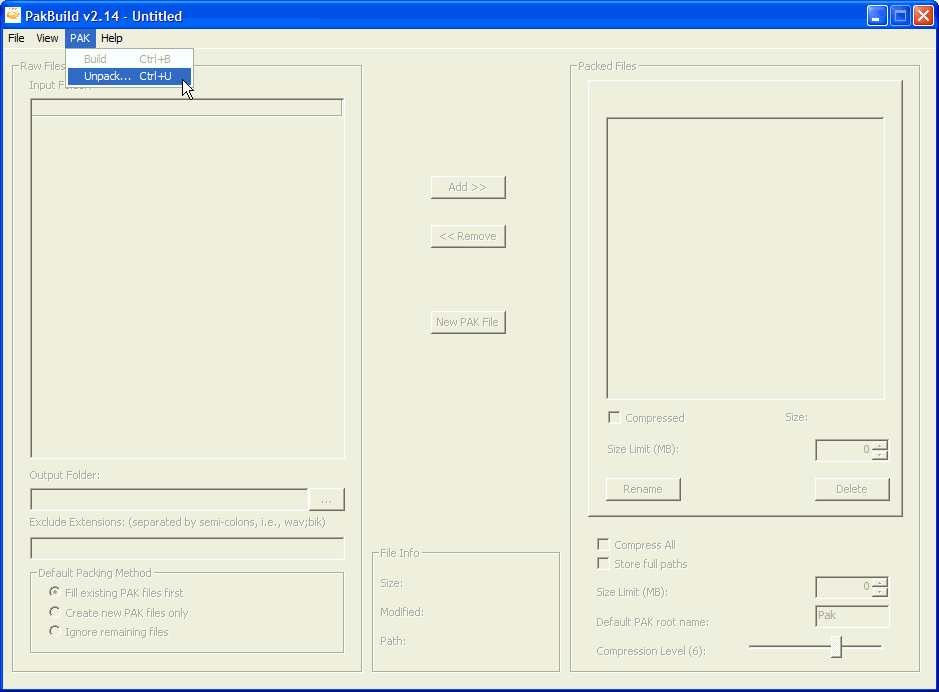
2. From the menu, select PAK->Unpack.
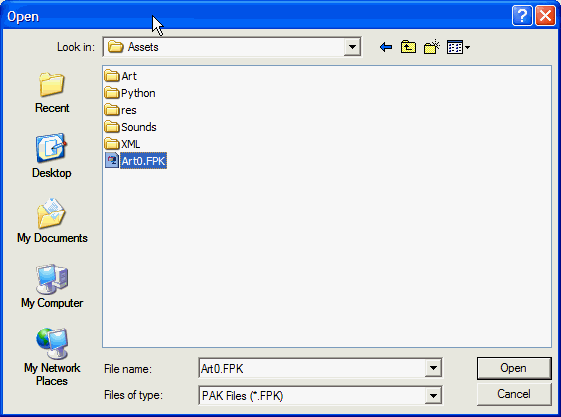
3. Go to your Civ 4 Folder, Assets subdirectory (CivilizationIV\Assets), select the Art0.FPK file, click Open.
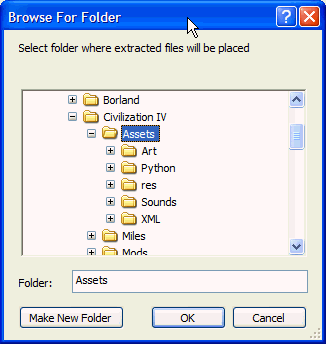
4. You'll be prompted to select an extraction folder, select CivilizationIV\Assets - same folder as above.
5. Wait. The program may appear to hang with the progress bar at 100%, but it will be done with unpacking in 2-5 minutes.
6. Move the Art0.FPK file out of your Assets folder so that Civ4 can't find it.
7. Clean out the game cache. See the insttuctions here
8. Run Civ4.

Please report your video card and whether this works for you.

Thanks!
If you still can't get the game to run, you can try clearing the game's cache:

http://forums.civfanatics.com/showpo...&postcount=185

Some screenshots:


It seems to be working for almost everyone!

Last edited by Thunderfall; Dec 01, 2005 at 08:52 PM. Reason: edited with full info and screenshots
Vael is offline   Reply With Quote
Old Oct 27, 2005, 03:20 PM   #2
ainwood
I am The Law.

 
ainwood's Avatar
 
Join Date: Oct 2001
Posts: 26,045
Thanks, Vael.

We'll try to post a Step-By-Step list of what to do here ASAP.

Others - if it works, please post here. If it doesn't, then Firaxis will probably want more info from you.

Last edited by Thunderfall; Oct 27, 2005 at 05:20 PM. Reason: Changed link to local download mirror for unpak utility.
ainwood is offline   Reply With Quote
Old Oct 27, 2005, 03:24 PM   #3
oldStatesman
Cybernaut
 
oldStatesman's Avatar
 
Join Date: Feb 2005
Location: Random Map
Posts: 983
Thanks!

But being a paranoid type, what exactly is this app and what does it do? I won't run an unknown app on my PC...
oldStatesman is offline   Reply With Quote
Old Oct 27, 2005, 03:25 PM   #4
Vael
Shadow Angel
 
Vael's Avatar
 
Join Date: Mar 2005
Posts: 608
It removes the contents from the PAK file that comes with the game. There apepars to be a problem with reading it and the game will crash. This utility extracts the files so they're no longer stored in the PAK.
Vael is offline   Reply With Quote
Old Oct 27, 2005, 03:28 PM   #5
zjl56
Emperor
 
zjl56's Avatar
 
Join Date: Apr 2004
Location: Iowa
Posts: 1,126
Then what is the point of moving the PAK after extracting?
zjl56 is offline   Reply With Quote
Old Oct 27, 2005, 03:29 PM   #6
Thunderfall
Administrator

 
Thunderfall's Avatar
 
Join Date: Oct 2000
Location: NY, USA
Posts: 12,745
Images: 1394
That Unpak app is an official utility released by Firaxis to unpack game assets. So don't worry.

We have a local download mirror for it here also: http://www.civfanatics.net/downloads...y/PakBuild.zip
__________________
Thunderfall
Weight: 1.0
Value: 161
Cast When used
Shock Damage 1 to 25 points on Touch
Thunderfall is offline   Reply With Quote
Old Oct 27, 2005, 03:29 PM   #7
Amniotic
Chieftain
 
Join Date: Oct 2005
Posts: 7
This worked for me, x800 XL, previously had the renderer error.

Last edited by Amniotic; Oct 27, 2005 at 03:33 PM.
Amniotic is offline   Reply With Quote
Old Oct 27, 2005, 03:30 PM   #8
kca89
Chieftain
 
kca89's Avatar
 
Join Date: Oct 2005
Location: Georgia, USA
Posts: 19
Does this just fix issues of just being able to even play the game or lots of the graphical errors we see because if it fixes all graphical errors I wanna know if this works for Nvidia as well.
kca89 is offline   Reply With Quote
Old Oct 27, 2005, 03:32 PM   #9
Zoomba
Chieftain
 
Zoomba's Avatar
 
Join Date: Oct 2005
Posts: 20
Worked for me
Zoomba is offline   Reply With Quote
Old Oct 27, 2005, 03:34 PM   #10
I_batman
Emperor
 
Join Date: Jun 2004
Location: markham, ontario
Posts: 1,255
Quote:
Originally Posted by Thunderfall
That Unpak app is an official utility released by Firaxis to unpack game assets. So don't worry.

We have a local download mirror for it here also: http://www.civfanatics.net/downloads...y/PakBuild.zip

Hope this fix works for everyone!
So why is this fix not posted on the front page of the Firaxis web site?
In fact, I see no mention of ANY bugs, let alone fixes on either the Firaxis or Take2 sites.
__________________
Of course, the whole point of a Doomsday Machine is lost, if you KEEP IT A SECRET! Why didn't you tell the world, EH?
I_batman is offline   Reply With Quote
Old Oct 27, 2005, 03:37 PM   #11
alva848
nothing on my mind!!!
 
alva848's Avatar
 
Join Date: Mar 2002
Posts: 181
Errr guys, people over at poly have followed teh instruction and are now playing the game!!

So far 1 report of a faillure (win2000 box), all others worked!!!!!!

that reason enough?
alva848 is offline   Reply With Quote
Old Oct 27, 2005, 03:38 PM   #12
CustodianV131
Warlord
 
CustodianV131's Avatar
 
Join Date: Apr 2004
Posts: 275
Quote:
Originally Posted by I_batman
So why is this fix not posted on the front page of the Firaxis web site?
In fact, I see no mention of ANY bugs, let alone fixes on either the Firaxis or Take2 sites.
It will show up there or be put into a patch, but they wanted to get the fix to the fans ASAP.
CustodianV131 is offline   Reply With Quote
Old Oct 27, 2005, 03:39 PM   #13
Felton
Chieftain
 
Join Date: Sep 2004
Posts: 16
Works for me too. Go somebody.
Felton is offline   Reply With Quote
Old Oct 27, 2005, 03:39 PM   #14
Colonel Kraken
Deity
 
Colonel Kraken's Avatar
 
Join Date: Dec 2001
Location: Grand Rapids, MI
Posts: 2,402
Looks like it's meeting with incredible success with LOTS of ATI users at Apolyton.

(I don't actually have the game yet. --but I do have an ATI card, which is why I'm keeping tabs on this stuff.)
Colonel Kraken is offline   Reply With Quote
Old Oct 27, 2005, 03:40 PM   #15
JJColorado
Chieftain
 
Join Date: Sep 2005
Location: Denver, Colorado
Posts: 2
Dell doesn't work

Hi,

I'm unable to install Catalyst Mobility 5.10 for Windows XP drivers from ATI. I have a Dell XPS laptop with a 256MB Mobility Radeon 9800 card. On ATI's page Dell is not listed as a supported computer manufacturer. Also when I try to run the install executable it says something like thanks for your interest but the drivers can't be installed on your PC.

Does anyone know where to get the 5.10 drivers for Dell PC's?

If I go to Dell's site they will let me download the following driver but it does not seem to be the Catalyst 5.10 driver set:
ATI Mobility Radeon 9800, v.8.162-050803a2-025875C, A05

Help? Without this I can't follow the recommended fix above....

thanks!!!
JJColorado is offline   Reply With Quote
Old Oct 27, 2005, 03:43 PM   #16
Euphoric One
Chieftain
 
Join Date: Oct 2005
Posts: 16
It works!!!!!
Euphoric One is offline   Reply With Quote
Old Oct 27, 2005, 03:43 PM   #17
Iolum
Chieftain
 
Join Date: Oct 2005
Posts: 59
Quit cryin and start extracting !
Iolum is offline   Reply With Quote
Old Oct 27, 2005, 03:46 PM   #18
MRM
Prince
 
MRM's Avatar
 
Join Date: Sep 2005
Location: Hamburg, Germany
Posts: 424
No - not playing yet

I have no error massage any more. The Game simply don't start ( no hanging, just dissapearing as if it was closed )

how many files are in the pak ? it extracted only one - is this correct ? ( CivGameCoreDLL.dll

System

AMD 2400 +
Radeon 9600 Pro
MRM is offline   Reply With Quote
Old Oct 27, 2005, 03:47 PM   #19
Iolum
Chieftain
 
Join Date: Oct 2005
Posts: 59
It works after all ! Woo hooo !
Iolum is offline   Reply With Quote
Old Oct 27, 2005, 03:47 PM   #20
cjkug
Chieftain
 
Join Date: Oct 2005
Posts: 3
I was so hoping to see something like this before I left work today. Thank you. 12 minutes to go

EDIT: Works and runs GREAT!!!

Last edited by cjkug; Oct 27, 2005 at 04:47 PM.
cjkug is offline   Reply With Quote
Reply

Bookmarks

Go Back Civilization Fanatics' Forums > CIVILIZATION IV > Civ4 - General Discussions > IMPORTANT: Support page & New Fix for Radeon Cards

Thread Tools

Posting Rules
You may not post new threads
You may not post replies
You may not post attachments
You may not edit your posts

BB code is On
Smilies are On
[IMG] code is On
HTML code is Off

Forum Jump

Similar Threads
Thread Thread Starter Forum Replies Last Post
Support Page on Official Civ4 Site & Patch Download Thunderfall Civ4 - Bug Reports 58 May 08, 2010 02:30 AM
VERY IMPORTANT: ATI Radeon Cards - Make Game Unplayable Vasudan Ace Civ4 - Technical Support 3 Aug 25, 2007 07:28 AM
Support for Mobility Radeon 9000 juha_pellikaine Civ4 - Technical Support 7 Jul 27, 2006 01:04 AM
Radeon 7500 or comparable 32 MB Graphics cards? DrEvil1996 Civ4 - Technical Support 6 Oct 27, 2005 12:04 AM
Omega Drivers Fix Crashes With Mobility Radeon Cards Sigma-X Civ4 - General Discussions 3 Oct 26, 2005 11:29 PM


All times are GMT -6. The time now is 08:34 AM.


Powered by vBulletin®
Copyright ©2000 - 2010, Jelsoft Enterprises Ltd.
This site is copyright © 2000 - 2009, Civilization Fanatics' Center.
Support CFC: Amazon.com | EB Games | Amazon UK | Amazon DE | Amazon CA | Amazon FR