UGO
Civilization Fanatics' Center  

Welcome to Civilization Fanatics' Center.

You are currently viewing our site as a guest which gives you limited access to our site features. By joining our free community, you will be able to participate in the discussions, search the forum, send private messages, vote in polls, upload your own screenshots to the gallery, and access many other special features. Registration is fast, simple and absolutely free, so sign up today! If you have any problems with the registration process or your account login, please contact support.

Go Back   Civilization Fanatics' Forums > CIVILIZATION III > Civ3 - Creation & Customization > Utility Programs

Reply
 
Thread Tools
Old Apr 01, 2004, 08:46 AM   #1
Arphahat
Chieftain
 
Arphahat's Avatar
 
Join Date: Mar 2004
Location: Portage, MI
Posts: 55
Easy screenshot tool for Civ! ScreenShotAssistant

Taking a screenshot can be a cumbersome process. You have to hit the "print screen" key, alt-tab to windows, start your paint program, paste, and save. If you don't take care to clear out the clipboard buffer, you may actually crash your game.

But, there is now a better way.

I wrote a utility that I call the ScreenShotAssistant. Now, to take a screenshot, you run this utility before you start Civ, decide on the naming convention and types of files you want to save, minimize and then start Civ. When you want a screenshot, simply hit the "print screen" key and the ScreenShotAssistant does the rest. It also clears the clipboard after saving the image to make sure that Civ doesn't have memory issues.

This is the first release, and I would love feedback. You can post here and on the forums at the project website, http://sourceforge.net/projects/screenassist.

EDIT: SSA 2.21 now available, with added features such as the "Generate Webpage" button, "Copy Filenames" button and the much requested "Civ 3" turn extractor. Go download now!
EDIT: SSA 2.1 now available, with added features such as the pause button and Index padding. Go download now!
__________________
Check out the easy way to take screenshots of your CivIII game -->ScreenShotAssistant 2.21

or see the thread in this forum.

Last edited by Arphahat; Jan 25, 2005 at 06:33 PM.
Arphahat is offline   Reply With Quote
Old Apr 01, 2004, 08:52 AM   #2
Phil Schneider
Chieftain
 
Phil Schneider's Avatar
 
Join Date: Oct 2003
Location: Germersheim, Germany
Posts: 82
I haven't downloaded it yet, but it sounds good

Edit: My I also get it for free?
__________________
The EU health ministers: Reading / Having read this post can cause heavy health damages

Last edited by Phil Schneider; Apr 01, 2004 at 08:55 AM.
Phil Schneider is offline   Reply With Quote
Old Apr 01, 2004, 09:00 AM   #3
Arphahat
Chieftain
 
Arphahat's Avatar
 
Join Date: Mar 2004
Location: Portage, MI
Posts: 55
Oops, I should have mentioned that it is free. Actually, it is free and the source code is available for download, too.
__________________
Check out the easy way to take screenshots of your CivIII game -->ScreenShotAssistant 2.21

or see the thread in this forum.
Arphahat is offline   Reply With Quote
Old Apr 02, 2004, 09:09 AM   #4
Arphahat
Chieftain
 
Arphahat's Avatar
 
Join Date: Mar 2004
Location: Portage, MI
Posts: 55
I've been having trouble accessing the Sourceforge site today, so I am including the Setup.exe file for download here as well.
Attached Files
File Type: zip screenshotassistant.zip (360.9 KB, 487 views)
__________________
Check out the easy way to take screenshots of your CivIII game -->ScreenShotAssistant 2.21

or see the thread in this forum.
Arphahat is offline   Reply With Quote
Old Apr 03, 2004, 05:26 PM   #5
sabrewolf
Demidemigod
 
sabrewolf's Avatar
 
Join Date: Jan 2004
Location: turicum, helvetistan
Posts: 142
absolutely wonderful!

thanks for the tool!
i've had a wierd problem with my win2k-server that print-screen didn't copy the screenshot into the clipboard.
with your tool i can finally make screenshots in the action (so maybe even in multiplaying games )

thanks again!


ps, i posted this same message at sourceforge as first entry in your discussion board there
__________________
- "artificial intelligence usually beats real stupidity"
sabrewolf is offline   Reply With Quote
Old Apr 03, 2004, 05:30 PM   #6
sabrewolf
Demidemigod
 
sabrewolf's Avatar
 
Join Date: Jan 2004
Location: turicum, helvetistan
Posts: 142
oh, and maybe you should rename the file. setup.exe is used nearly always. why not somthing like ScreenShotAssistSetup.exe?
__________________
- "artificial intelligence usually beats real stupidity"
sabrewolf is offline   Reply With Quote
Old Apr 03, 2004, 08:04 PM   #7
Arphahat
Chieftain
 
Arphahat's Avatar
 
Join Date: Mar 2004
Location: Portage, MI
Posts: 55
Thanks, I'm glad you like it.

Wow, my first feature request. I'll change the install name for the next release.
__________________
Check out the easy way to take screenshots of your CivIII game -->ScreenShotAssistant 2.21

or see the thread in this forum.
Arphahat is offline   Reply With Quote
Old Apr 03, 2004, 08:15 PM   #8
sabrewolf
Demidemigod
 
sabrewolf's Avatar
 
Join Date: Jan 2004
Location: turicum, helvetistan
Posts: 142
well, if you really want some feature requests (the thing above is just the filename), how about having your program having an option to save the files with the year value (eg. 3450 BC, 1320 AC, etc)?

an easy solution would be to check the lastest autosave in the directory (you could find out which game is played by checking the process name: civ3.exe, civ3ptw.exe, civ3conq.exe) and using a directory listener. this method is used by ainwood's diplomacy helper.

the nicer (but much more difficult version) would be to check the memory offsets to get the year (or at least the turn-number, and then extrapolate from there). gramphos, ainwood, spiderzord or CCJ39 could maybe help you with this...

oh... but then it would have to be a seperate version for civ3... other people at sf.net probably will need it for other purposes
__________________
- "artificial intelligence usually beats real stupidity"
sabrewolf is offline   Reply With Quote
Old Apr 03, 2004, 08:25 PM   #9
Arphahat
Chieftain
 
Arphahat's Avatar
 
Join Date: Mar 2004
Location: Portage, MI
Posts: 55
I kinda thought about trying to tie it in to the actual year, but was anxious to get a working version out, so I left that for later, hoping no one would notice.

I like the idea of checking the memory offsets. Maybe gramphos, ainwood, spiderzord or CCJ39 would provide me with the info I need. I'll send a PM to them.

And, it shouldn't be too complicated to create seperate CIVIII release at SourceForge, so all is good. Conceivably, it could have specifics for multiple different games built in.
__________________
Check out the easy way to take screenshots of your CivIII game -->ScreenShotAssistant 2.21

or see the thread in this forum.
Arphahat is offline   Reply With Quote
Old Apr 04, 2004, 09:21 AM   #10
Capt Buttkick
Captain
 
Capt Buttkick's Avatar
 
Join Date: Mar 2003
Location: Feet on t ground Head in t clouds
Posts: 1,760
Images: 2
I'll use this so here's a
__________________
It's against my programming to impersonate a deity. C-3PO
FORE!

JFWI?
JFGI!
Capt Buttkick is offline   Reply With Quote
Old Apr 04, 2004, 12:37 PM   #11
Lambda
Chieftain
 
Lambda's Avatar
 
Join Date: Mar 2004
Location: Lisboa, Portugal
Posts: 21
this is GREAT!

it is really a great tool, and it has an huge advantage: it can be used everywhere. i now use this tool to take screeshots in everygame that havent a SS bind and i also use it to take SS of my desktop and programs. thanks man, i never thought that a tool like this could be so useful.
__________________
"What we have to accomplish at this time is all the more clear: Relentless criticism of all existing conditions, relentless in the sense that the criticism is not afraid of its findings and just as little afraid of the conflict with the powers that be." Karl Marx

"As I have said before, the ever more sophisticated weapons piling up in the arsenals of the wealthiest and the mightiest can kill the illiterate, the ill, the poor and the hungry, but they cannot kill ignorance, illness, poverty or hunger" Fidel Castro
Lambda is offline   Reply With Quote
Old Apr 12, 2004, 07:32 AM   #12
Lambda
Chieftain
 
Lambda's Avatar
 
Join Date: Mar 2004
Location: Lisboa, Portugal
Posts: 21
plus i have a sugestion, i think that an opition like: "minimiza and put in tray" would be great, in that way we could just run it on startup and it will appear in tray, this is wonderful to if you wanna take a SS from your desktop, i wont's have a program in you taskbar but in tray.

think abou this, i think taht it's easy to do it and would be very nice!
__________________
"What we have to accomplish at this time is all the more clear: Relentless criticism of all existing conditions, relentless in the sense that the criticism is not afraid of its findings and just as little afraid of the conflict with the powers that be." Karl Marx

"As I have said before, the ever more sophisticated weapons piling up in the arsenals of the wealthiest and the mightiest can kill the illiterate, the ill, the poor and the hungry, but they cannot kill ignorance, illness, poverty or hunger" Fidel Castro
Lambda is offline   Reply With Quote
Old Apr 12, 2004, 08:52 AM   #13
Arphahat
Chieftain
 
Arphahat's Avatar
 
Join Date: Mar 2004
Location: Portage, MI
Posts: 55
That's a good idea; I will add tray minimize for the next release.
__________________
Check out the easy way to take screenshots of your CivIII game -->ScreenShotAssistant 2.21

or see the thread in this forum.
Arphahat is offline   Reply With Quote
Old Apr 12, 2004, 12:23 PM   #14
sabrewolf
Demidemigod
 
sabrewolf's Avatar
 
Join Date: Jan 2004
Location: turicum, helvetistan
Posts: 142
another nice feature (but i don't know if it's possible):

download to different paths.
eg.
PrntScrn --> directory 1
SHIFT-PrntScrn --> directory 2
CTRL-PrntScrn --> directory 3

i'd use one for the game, one for directly to the desktop and one general purpose one... all with an own counter... it'd be great
__________________
- "artificial intelligence usually beats real stupidity"
sabrewolf is offline   Reply With Quote
Old Apr 12, 2004, 12:39 PM   #15
Arphahat
Chieftain
 
Arphahat's Avatar
 
Join Date: Mar 2004
Location: Portage, MI
Posts: 55
sabrewolf, do you mean you'd like to be able to have them all available at the same time, or would it be enough to be able to switch the directory and other settings quickly?

Although it may not be obvious, currently, by creating a new setting in SSA, you can specify exactly how you want it to behave. When you install, it comes with just the "default" setting. But, you can click on the "..." button in the setting area to create a new setting. For example, I have a setting called "gotm30" that has a directory, prefix, counter and image settings which differ from my "default" setting.
__________________
Check out the easy way to take screenshots of your CivIII game -->ScreenShotAssistant 2.21

or see the thread in this forum.
Arphahat is offline   Reply With Quote
Old Apr 12, 2004, 02:49 PM   #16
sabrewolf
Demidemigod
 
sabrewolf's Avatar
 
Join Date: Jan 2004
Location: turicum, helvetistan
Posts: 142
duh... i am so stupid!!! sorry... didn't even look at that anymore... i've only been trying around with the index and the prefix
__________________
- "artificial intelligence usually beats real stupidity"
sabrewolf is offline   Reply With Quote
Old Apr 12, 2004, 03:12 PM   #17
Arphahat
Chieftain
 
Arphahat's Avatar
 
Join Date: Mar 2004
Location: Portage, MI
Posts: 55
Nah, you're not stupid; I need to include more extensive documentation for all the features. I plan on updating the help section for the next release.
__________________
Check out the easy way to take screenshots of your CivIII game -->ScreenShotAssistant 2.21

or see the thread in this forum.
Arphahat is offline   Reply With Quote
Old Jun 28, 2004, 03:00 PM   #18
sabrewolf
Demidemigod
 
sabrewolf's Avatar
 
Join Date: Jan 2004
Location: turicum, helvetistan
Posts: 142
ok, i just posted a bug report (well, kind of) and another feature request at sourceforge
__________________
- "artificial intelligence usually beats real stupidity"
sabrewolf is offline   Reply With Quote
Old Jul 09, 2004, 12:09 PM   #19
Taé Shala
Prince
 
Taé Shala's Avatar
 
Join Date: Nov 2001
Location: 50°47'51 N 8°45'50 E
Posts: 497
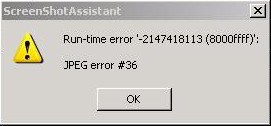
I really like you prog.

But from time to time I get this Run-time error warning:


Any ideas how to stop it?
Taé Shala is offline   Reply With Quote
Old Jul 09, 2004, 04:21 PM   #20
sabrewolf
Demidemigod
 
sabrewolf's Avatar
 
Join Date: Jan 2004
Location: turicum, helvetistan
Posts: 142
set output to png... it's anyway the superior graphics format
__________________
- "artificial intelligence usually beats real stupidity"
sabrewolf is offline   Reply With Quote
Reply

Bookmarks

Go Back Civilization Fanatics' Forums > CIVILIZATION III > Civ3 - Creation & Customization > Utility Programs > Easy screenshot tool for Civ! ScreenShotAssistant

Thread Tools

Posting Rules
You may not post new threads
You may not post replies
You may not post attachments
You may not edit your posts

BB code is On
Smilies are On
[IMG] code is On
HTML code is Off

Forum Jump

Similar Threads
Thread Thread Starter Forum Replies Last Post
CIV 4 as a teaching tool mutiger Civ4 - General Discussions 32 Dec 09, 2008 09:40 PM
Flash CS3: Stuck on Oval Tool, Unable to change to Rectangle Tool damunzy Computer Talk 0 Oct 19, 2008 08:46 AM
Civ 3 Multi Tool Fishdert Civ3 - Technical Support 3 Feb 04, 2007 07:44 AM
Civ Translation Tool - Take 2 Déja Civ4 - Utility Programs 17 Apr 04, 2006 01:45 AM
GOTM as a CIV learning tool - make it easy PLEASE! HangingChadDad Civ3 - Game of the Month 32 Apr 17, 2005 03:48 AM


All times are GMT -6. The time now is 08:07 AM.


Powered by vBulletin®
Copyright ©2000 - 2009, Jelsoft Enterprises Ltd.
This site is copyright © 2000 - 2009, Civilization Fanatics' Center.
Support CFC: Amazon.com | EB Games | Amazon UK | Amazon DE | Amazon CA | Amazon FR